What 4 Years of NASA HUNCH Taught Us About Planning Engineering Projects
Four years of NASA HUNCH hardware projects, each planned in one messy Google Doc. What went wrong, the planning steps we wish we’d used, and why we built Flowboard.
Roman Fairchild 5 min read
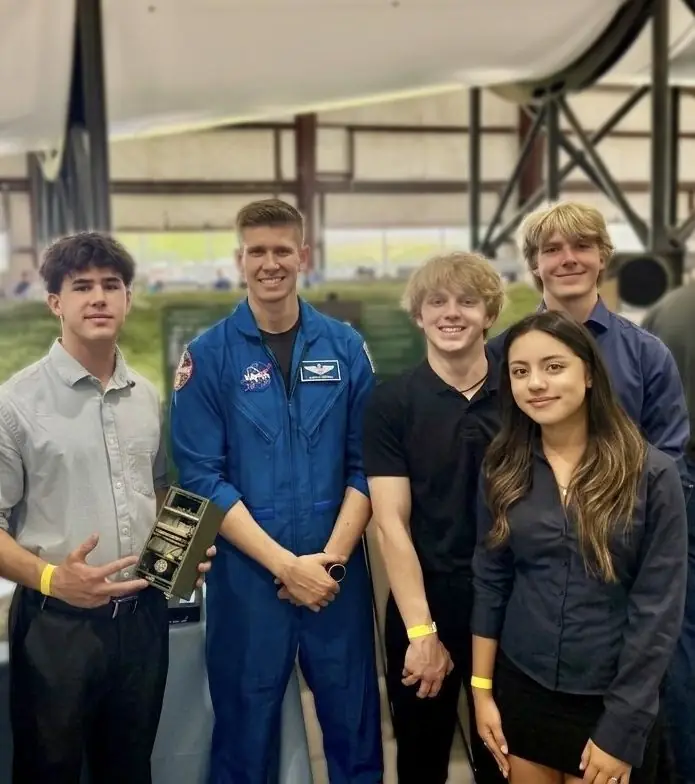
Back in high school, I spent four years in NASA HUNCH, designing and building hardware for NASA. Every year brought a new challenge and a new project. We presented to NASA engineers and judges, got flown out to Houston, and stood in front of real astronauts to pitch our invention.
Looking back, we also nearly fell apart along the way. Not because the engineering was too hard, but because each project lived in one giant, disorganized Google Doc.
This is what went wrong, the planning steps we wish we’d followed from day one, and why that mess eventually turned into Flowboard.
What is NASA HUNCH?
HUNCH stands for High school students United with NASA to Create Hardware. It’s a long-running NASA program where students design and build real products for astronauts on the International Space Station (NASA). It has reached more than 24,000 students from over 1,700 schools in 46 states (Voyager Technologies).
Our team was in the design and prototyping track. It works like a real engineering contract:
- NASA hands you a problem statement, plus rules, guidelines and constraints.
- You research, design and build a prototype that meets them.
- You present to judges through formal design reviews, like a CDR (critical design review).
- If your design stands out, you’re invited to Houston to present to NASA engineers and astronauts.
We made it to that last step. We presented in the massive George W.S. Abbey Rocket Park building with the unbelievably large 36-story Saturn V rocket, a truly breathtaking display of human ingenuity, and got to see the Neutral Buoyancy Lab, where astronauts train underwater. To this day, it’s still one of the best experiences of my life.
Two of our favorite projects:
- NANO LAB for Space Crop Production: an enclosure that grew and monitored microgreens in zero gravity on its own, using sensors, LEDs, cameras, pumps, Raspberry Pis and custom code. We tested capillary materials for efficient water transfer and built an interactive display, which we presented to NASA judges and astronauts in Houston.
- Lunar Landing Legs: our One Stop Drop system used elastic spandex to lock the legs at a set angle so they wouldn’t bounce back, stabilizing legs to prevent tilting, and memory foam to land the payload safely, then triggering a release mechanism to safely drop off a weighted payload.
What went wrong: one Google Doc for everything
Every year we took on a new project with a team of five or six people. And every year, everything we produced went into one shared Google Doc: research, sketches, test notes, ideas, to-do lists. There was no structure to it. We just kept dumping things in.
That caused four problems that fed each other:
- Nobody knew their role. Without clear owners, the same task got done twice or not at all, and we argued about who was supposed to do what.
- There was no plan. We never set real deadlines, a calendar or a Gantt chart. Each design review turned into a scramble.
- Nothing was documented properly. Research and test results were buried somewhere in the doc, if they were written down at all. In a program judged on your design process, that hurt.
- Nobody could see the big picture. A long document shows you one page at a time. No one could look at it and say where we were or what came next.
We did get through it, and we’re proud of what we built. But year after year, we finished with far less to show for our work than we should have. The problem was never effort. It was that we had nowhere to organize it.
How to plan a team hardware project: what we’d do differently
If you’re starting a HUNCH project, a robotics season, a senior design project or any team build, these are the steps we wish we’d taken in week one.
- Turn the problem statement into a checklist. Copy every requirement and constraint from the prompt into its own line. Each one becomes something you must prove your design meets, so you can check it off at each review.
- Map the whole project in phases. Research, concept, design, prototype, test, final presentation. Put them left to right where everyone can see them, so the team always knows which phase you’re in.
- Break each phase into steps with one owner each. Every step gets exactly one name on it. Two people can help, but one person is responsible. This alone would have saved us most of our arguments.
- Work backward from your review dates. Put every design review and deadline on a calendar first, then give each step a due date that leaves room before it. Reviews should never be a surprise.
- Mark what depends on what. Some steps can’t start until others finish. You can’t machine parts before the CAD is approved. Make those dependencies visible so nobody starts too early or waits without knowing why.
- Keep research and test results next to the step they belong to. Don’t put them in one long running document. When a judge asks why you chose a material, the answer should sit right on that design step.
- Review the plan every week. Ten minutes: what’s done, what’s late, what’s blocked. Then update the board. A plan that isn’t updated stops being trusted, and then stops being used.
Why we built Flowboard
Even after HUNCH, we kept asking what we would have needed to do it right. A to-do app was too flat. A whiteboard had no deadlines. A Google Doc was what got us into trouble in the first place, and apps like Trello, Lucidchart and Notion didn’t have the features or the format we needed.
So we built Flowboard, a visual workspace where a project is laid out step by step on one canvas:
- Phases and steps you can see at once, connected in order, so everyone knows where the project stands (visual project planning).
- An owner, status and due date on every step, with a timeline and calendar built from those dates (project timelines).
- Gates that hold a step back until what it depends on is done (gates).
- Research, test results and documents attached to the step they belong to, so your documentation builds itself as you work.
It’s the tool we wish we’d had back then. If you’re planning a team build, see how engineers use Flowboard or start a free 7-day trial.