6 Best Project Planning Software Tools in 2026 (Compared)
Compare 6 project planning tools in 2026, including Trello, Asana, ClickUp and more. Explore pricing, pros and cons, and what real users say.
In high school, my NASA HUNCH team planned four years of hardware projects in one giant Google Doc. It didn’t go well. Nobody knew who owned what, review dates snuck up on us, and our research was buried somewhere in that doc. (Here’s that whole story.)
After that, we looked at a lot of planning tools, and eventually built our own. This guide compares the six tools that come up most when people ask for recommendations: Trello, Asana, ClickUp, monday.com, Notion, and Microsoft Planner and Project.
Two things I want to be upfront about. First, we make Flowboard, so to be unbiased, we excluded it from the comparison and added its own section near the end. Second, none of these companies paid to be here.
The short answer
- If you want something simple: Trello
- If you’re a small team with real deadlines: Asana
- If you want everything in one app and don’t mind setting it up: ClickUp
- If your managers want dashboards: monday.com
- If your notes already live in Notion: Notion
- If you need a detailed schedule and already pay for Microsoft 365: Microsoft Planner and Project
Side-by-side comparison
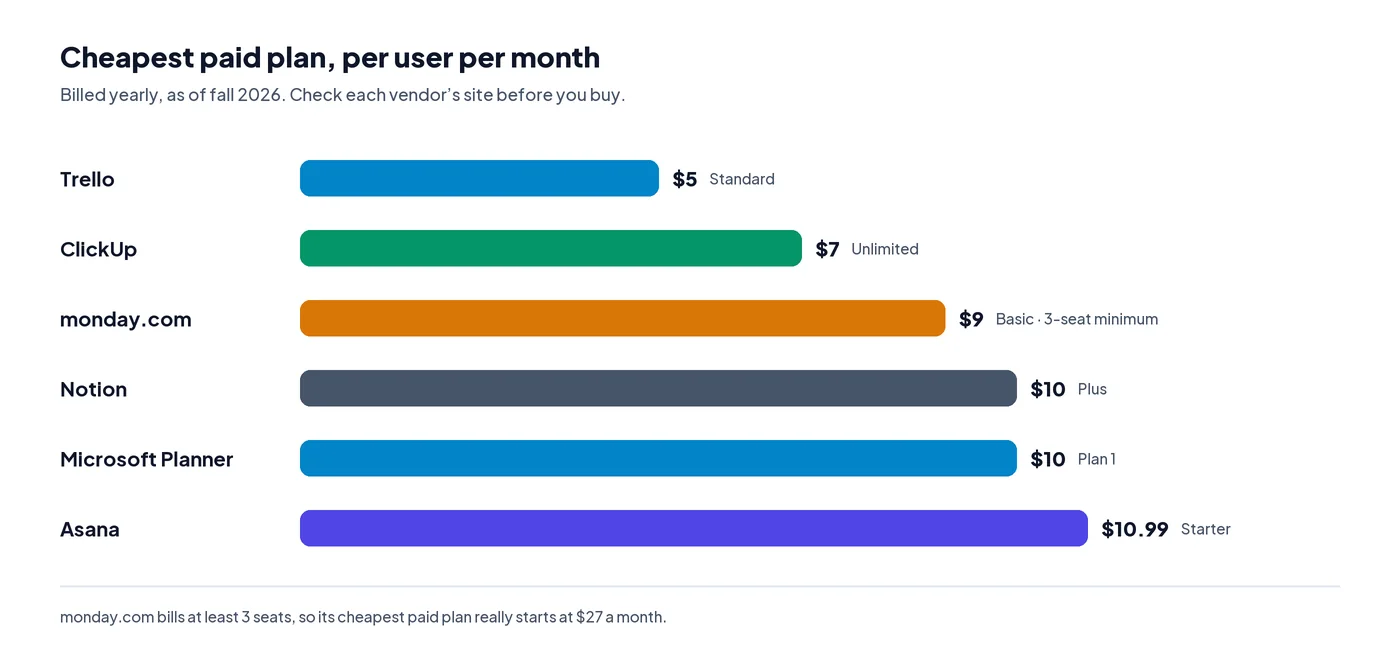
Paid prices are per person, per month, billed yearly, as of fall 2026.
| Tool | Good for | Free plan | Paid plans start at |
|---|---|---|---|
| Trello | Simple boards | 10 collaborators, 10 boards | $5 |
| Asana | Small teams with deadlines | 2 users | $10.99 |
| ClickUp | One app for everything | Unlimited users, limited storage | $7 |
| monday.com | Visual dashboards | 2 seats, 3 boards | $9 (3-seat minimum) |
| Notion | Plans next to your notes | Yes | $10 |
| Microsoft Planner and Project | Detailed schedules | Basic Planner with Microsoft 365 | $10 |
What project planning software actually does
Project planning software helps you figure out what needs to happen, in what order, who’s doing it, and by when. Then it helps you keep track as the work gets done.
Most tools show your plan in one of four ways: a board of cards (Kanban), a list, a calendar, or a timeline (a Gantt chart). Boards work well for ongoing work. Timelines matter more when one step can’t start until another one finishes. You can’t machine parts before the CAD is approved, for example.
How I put this together
- Prices. I checked each tool’s pricing in October and November 2026, using recent breakdowns of each vendor’s pricing page, and worked out what a small team actually pays.
- Complaints. I read through user discussions on Reddit, Hacker News, the Atlassian Community forum, G2 and Capterra, and only kept problems that came up more than once.
- Four questions. For each tool: Which views does it give you? What does it really cost a team of three to ten? How much setup does it take? Do people keep using it?
- What I left out. Tools built mainly for software developers, like Jira and Linear. They deserve their own comparison.
1. Trello: the simplest place to start
Trello is a board of cards you drag from “To do” to “Done.” If you’ve never used a planning tool before, this is the one you’ll figure out fastest.
What’s good
- Most people get it in a few minutes
- The free plan is enough for a small group
- Power-Ups add things like calendars and custom fields
What’s not
- The free plan only gives you the board view. Timelines and calendars need Premium.
- The free plan caps you at 10 collaborators across your whole Workspace, guests included
- Once steps start depending on each other, a board gets hard to follow
That last one is roughly where Trello fell short for our HUNCH projects. We needed to see which steps had to wait on others, and a board doesn’t really show that.
Price: Free for up to 10 collaborators and 10 boards per Workspace. Standard is $5 per person a month billed yearly, and Premium is $10 (pricing breakdown).
What people say: The thing that comes up most is the free plan limit. When Trello capped free Workspaces at 10 collaborators in 2024, Atlassian’s announcement got more than 300 comments (Atlassian Community). If you go over, every board in the Workspace becomes view-only, and automations stop running (Trello support).
A lot of people didn’t realize the limit counts the whole Workspace, not just one board. One company said both of its free Workspaces were stuck in read-only mode for a month while it thought it had fewer than 10 users (Atlassian Community).
Still, Trello is what most people on Reddit recommend to small, non-technical teams. One manager said they got six interns set up in ten minutes (Reddit roundup by ONES).
Pick it if your team is small, your work moves through a few simple stages, and you want people using it on day one.
2. Asana: a good middle ground for small teams
Asana has more structure than Trello, but it doesn’t ask you to build a whole system first. The same tasks can show up as a list, a board, a calendar or a timeline.
What’s good
- It’s clear who owns each task and when it’s due
- You get a timeline (Gantt) view on the cheapest paid plan
- Good templates and free guides to get started
What’s not
- The free plan now only covers 2 people
- Some teams have trouble shaping it around how they actually work
- Goals, portfolios and workload views need the Advanced plan, which costs more than twice as much
Price: Free for up to 2 people. Starter is $10.99 per person a month billed yearly ($13.49 monthly), and Advanced is $24.99 (Carly). Starter doesn’t include goals, portfolios or workload management (Alfred).
What people say: G2 reviewers like how clearly Asana shows tasks, timelines and who owns what. Some also say it’s hard to set up around their specific workflow (G2).
In an older Ask HN thread that still holds up, one team tried Trello, Asana and Jira over three months and landed on a simple rule: Jira for very technical teams, Asana for everyone else, Trello for personal use (Hacker News). On Reddit, people often call it a “grown-up Trello” (Reddit roundup by ONES).
Pick it if you have three or more people, deadlines that matter, and nobody who wants to build a system from scratch.
3. ClickUp: the most generous free plan
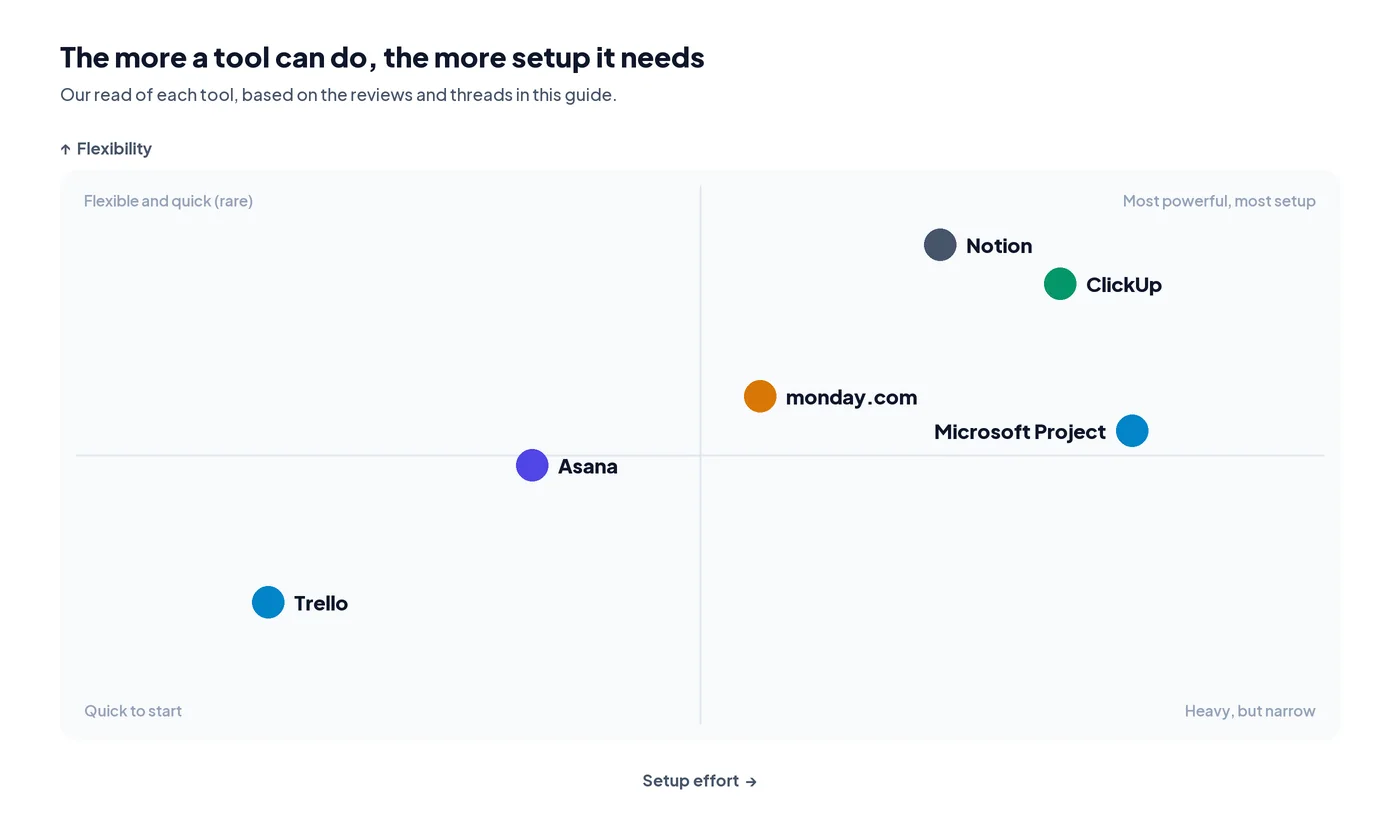
ClickUp tries to be everything at once: tasks, docs, goals, whiteboards, chat and time tracking, all in one app. That’s its biggest strength, and also its biggest problem.
What’s good
- The free plan has unlimited users and tasks
- Docs, goals and whiteboards are built in
- The cheapest full-featured paid plan here, at $7
What’s not
- There’s so much in it that a lot of people find it overwhelming
- Some reviewers mention lag with big, complex documents
- AI features cost extra on top of your plan
Price: Free Forever has unlimited users and tasks, with limits on storage and automations. Unlimited is $7 per person a month billed yearly, and Business is $12 (Carly).
What people say: One G2 reviewer put it well: they love that everything is in one place, but it can feel overwhelming at times (G2). On Capterra, some people switched over from Trello for the built-in docs, while others mention lag with complex documents (Capterra).
On Reddit, there’s a steady trickle of teams going from ClickUp back to Trello. The reason is usually simple: people actually used the simpler tool (Reddit roundup by ONES).
Pick it if you want one app for everything, and someone on your team is happy to spend a few days setting it up.
4. monday.com: easy to read, harder to set up
monday.com is built around colorful, spreadsheet-style boards with status columns, plus dashboards that pull work together across projects.
What’s good
- New teammates can usually read a board right away
- The boards and dashboards are easy to customize
- Good templates, and strong automations on the higher plans
What’s not
- Every paid plan has a 3-seat minimum
- The Basic plan has no automations, no integrations and no timeline view
- Setting up boards and automations takes real work
Price: Free for up to 2 seats and 3 boards. Basic is $9 per seat a month billed yearly, but because of the 3-seat minimum, it really starts at $27 a month. Timeline and calendar views start on Standard, at $12 per seat (Carly).
What people say: On G2, people rate monday.com higher than Asana for ease of use, 9.1 to 8.6 (G2). Setup is a different story, though. Capterra reviewers say the first round of building boards and automations is the hardest part, and several say it’s expensive for a small company (Capterra, Capterra).
The complaint I saw most was the seat minimum. Freelancers and two-person teams end up paying for a seat nobody uses (iFeelTech).
Pick it if you have three or more people, managers who want dashboards, and room in the budget for the Standard plan.
5. Notion: great if your notes already live there
Notion is a flexible workspace made of pages and databases. You can build a project tracker with boards, timelines and dependencies, right next to your meeting notes and docs.
What’s good
- Your plans, docs and notes all live in one place
- The databases and views are incredibly flexible
- Small businesses rate it really highly
What’s not
- You build the system yourself, and it can get messy
- It has fewer built-in scheduling tools than a dedicated planner
- It takes longer to set up than Trello or Asana
We looked at Notion too, back when we were trying to replace our HUNCH Google Doc. It’s great for writing things down, but we would have had to build the whole planning side ourselves.
Price: There’s a free plan. Plus is $10 per person a month billed yearly ($12 monthly), and Business is $20 (Dupple).
What people say: On Capterra, Notion is the highest-rated project management tool for small businesses, at 4.74 out of 5 across more than 1,200 reviews (Capterra).
The catch is setup. Notion starts as a blank page, which is part of why there’s such a big market for paid Notion project templates. One Capterra reviewer who moved to ClickUp just said Notion felt too “busy” (Capterra).
Pick it if your team already writes everything in Notion, and someone actually enjoys building the system.
6. Microsoft Planner and Project: for detailed schedules
Microsoft Project, which is now mostly sold as part of Microsoft Planner, is the traditional choice for detailed schedules with dependencies and resources.
What’s good
- Deep scheduling, with dependencies and critical paths
- Works inside Microsoft 365, Teams and Outlook
- A lot of companies and schools already know it
What’s not
- Full scheduling costs $30 per person a month
- It’s more than most small teams need
- The plan names and features have changed a lot, which makes buying confusing
Price: Planner Plan 1 is $10 per person a month, and Planner and Project Plan 3 is $30 (CostBench). Microsoft stopped selling Project Plan 5 on May 1, 2026 (Kaeltripton).
Pick it if your school or company already runs on Microsoft 365, and you need a detailed schedule, not just a task board.
4 mistakes people keep making when they choose
These came up over and over in the threads and reviews I read. We’ve made a version of the last one ourselves.
- Only counting the people on one board. Trello’s free limit applies to your whole Workspace, guests included. Teams hit it without noticing, and every board goes read-only at the same time.
- Going by the per-person price. monday.com bills at least 3 seats, and Asana’s free plan stops at 2 people. Work out what your actual team would pay before you commit.
- Picking the most powerful tool. I get the appeal. More features feels safer. But teams that don’t want to build a system usually end up drifting back to something simpler.
- Moving everything over at once. Try the tool on one real project for two weeks first. If your team isn’t opening it by week two, it’s probably not the right fit, no matter what the feature list says. Our HUNCH Google Doc technically had everything in it. Nobody wanted to open it.
Where Flowboard fits (our tool)
One more reminder: this is the tool we make, so take this section with that in mind.
Even after HUNCH, we kept asking what we would have needed to do it right. The tools above are good at tracking tasks. What we wanted was help with the step before that: laying out the plan itself, in order, where the whole team could see it.
So we built Flowboard, a visual workspace where a project is laid out step by step on one canvas.
- Steps that wait their turn. Gates hold a step back until the one before it is done, a date arrives, materials are bought or a number hits its target.
- Big steps get their own plan. Any step can open into a sub-board, and its progress shows on the main board.
- Dates and docs in the same place. A timeline and calendar come straight from your plan, and documents sit on the step they belong to.
- Flowcharts and vision boards live on the same canvas too.
Price: $6 a month billed yearly, or $12 month to month, with every feature included and a 14-day free trial (pricing).
When it’s not the right pick: If you just need a shared to-do list, Trello’s free plan is simpler. If you’re running dozens of projects with time tracking and resource reports, Asana, monday.com or Microsoft Project are built for that, and I’d point you there.
How to choose
Start with the problem you’re actually trying to fix, not the feature list.
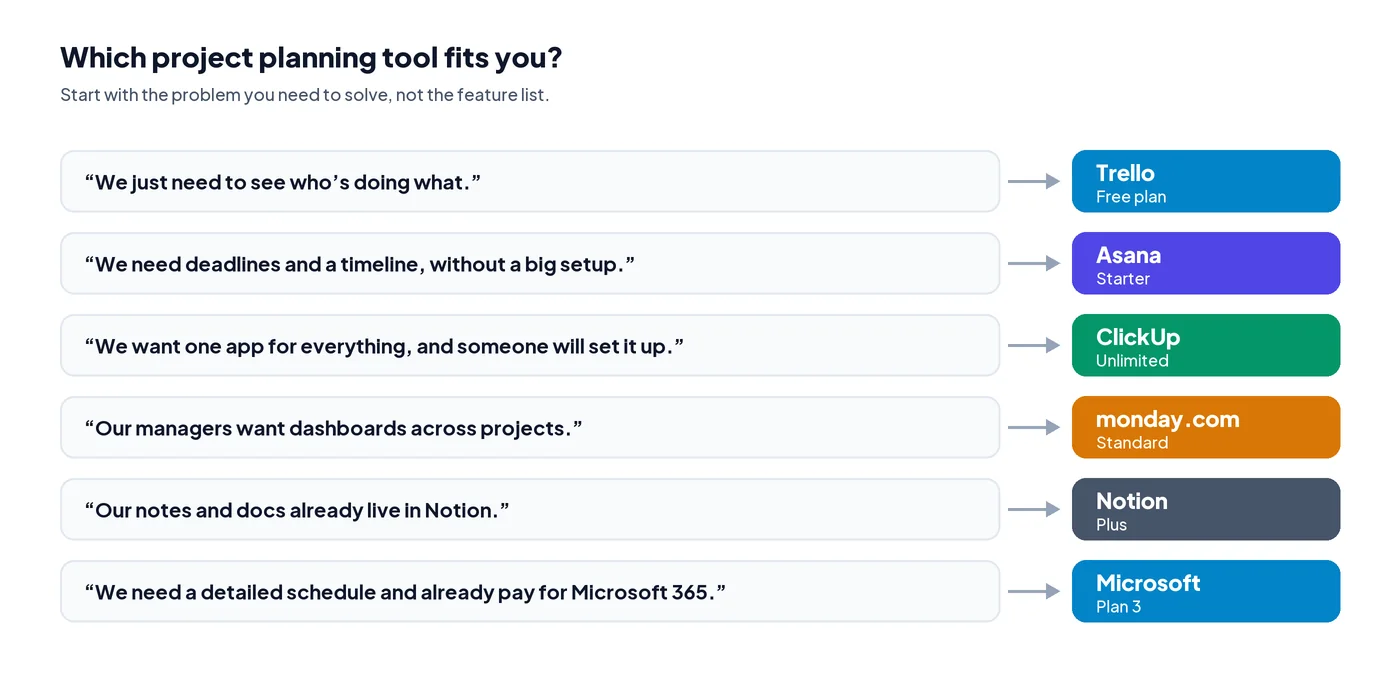
- “We just need to see who’s doing what.” Start with Trello’s free plan.
- “We need deadlines and a timeline, without a big setup.” Asana Starter.
- “We want one app for everything, and someone will set it up.” ClickUp.
- “Our managers want dashboards across projects.” monday.com Standard.
- “Our plans and notes are already in Notion.” Stay in Notion and add a project database.
- “We need a detailed schedule, and we already pay for Microsoft 365.” Microsoft Planner or Project.
- “We need to lay out a step-by-step plan where order matters.” Try Flowboard.
If you’re still not sure, start with a free plan from Trello or ClickUp on one small project. Two weeks of real use will teach you more than any comparison, including this one.
Sources
Pricing was checked against these summaries of each vendor’s pricing page in October and November 2026. Always confirm on the vendor’s site before buying.
- Trello pricing, Lilach Bullock
- Collaborator limit for free Workspaces, Trello support
- Update on Collaborator Limit for Free Trello Workspaces, Atlassian Community
- Free Workspaces stuck in read-only, Atlassian Community
- Asana pricing, Carly
- Asana pricing: what Starter includes, Alfred
- ClickUp pricing, Carly
- monday.com pricing, Carly
- Notion pricing, October 2026, Dupple
- Microsoft Project vs. Notion pricing, CostBench
- Project management software cost, Kaeltripton
- Asana vs. monday Work Management, G2
- monday.com vs. ClickUp, G2
- ClickUp reviews, G2
- ClickUp reviews, Capterra
- monday.com reviews, Capterra
- monday.com reviews, Capterra
- Best project management software for small businesses, Capterra
- monday.com review, iFeelTech
- Ask HN: What project management tool do you love?, Hacker News
- Trello vs. ClickUp: what Reddit users recommend, ONES
- ClickUp vs. Trello Reddit debate, ONES
Frequently asked questions
What is the best free project planning software?
For small teams, Trello’s free plan is the most generous for simple boards, with up to 10 collaborators. ClickUp’s free plan allows unlimited users but limits storage and automations. Asana and monday.com cap their free plans at 2 people.
What’s the difference between project planning and project management software?
Planning is deciding the steps, their order and the dates. Management is tracking the work as it happens. Most tools focus on management, and some, like Microsoft Project and Flowboard, put more weight on the plan itself.
Which project planning tool is easiest to learn?
Trello. It’s a board of cards you drag between columns, and most people learn it in minutes.
Do I need a Gantt chart?
Only if your steps depend on each other and dates matter, like a build that can’t start until parts arrive. For ongoing work with no fixed order, a board is usually enough.
Is Notion good for project planning?
It can be, especially if your notes already live there. Notion has boards, timelines and task dependencies, but you build the system yourself, so it takes more setup than a dedicated tool.
How much should a small team pay for project planning software?
Most paid plans cost $5 to $12 per person a month billed yearly. Watch for seat minimums, which can make a cheap plan cost more for very small teams.
Is Trello still free?
Yes, for up to 10 collaborators and 10 boards per Workspace. The cap counts everyone in the Workspace, including guests. Go over it and every board in that Workspace becomes view-only until you remove people or upgrade.