Lucidchart vs draw.io: Which Is Better in 2026?
Comparing Lucidchart and draw.io? We break down which free flowchart maker and diagramming software is best for teams, engineers, and beginners.
Ask a forum which flowchart tool to use and you’ll get two answers: Lucidchart or draw.io. Then people start arguing.
The truth is both make good flowcharts. What actually separates them is price, how the free plans are limited, how your team works together and where your files end up. That’s what decides which one fits you.
For this post I skipped the comparison pages written by Lucid and draw.io themselves. Instead I went through Hacker News threads, Lucid’s own community forum, university IT pages, and user reviews on G2 and Capterra. Below is what real users say, where each tool wins, and which one I’d pick.
Quick disclosure: we make Flowboard, a visual planning tool. It’s not part of this comparison. If you want the wider field, see our roundup of the 5 best flowchart software tools.
Lucidchart vs draw.io: the short answer
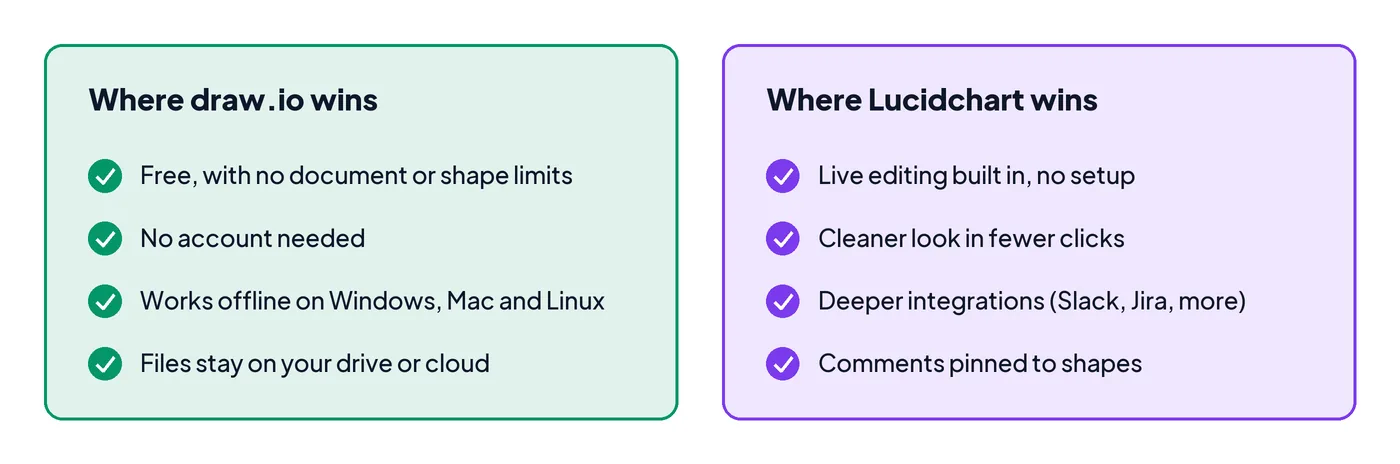
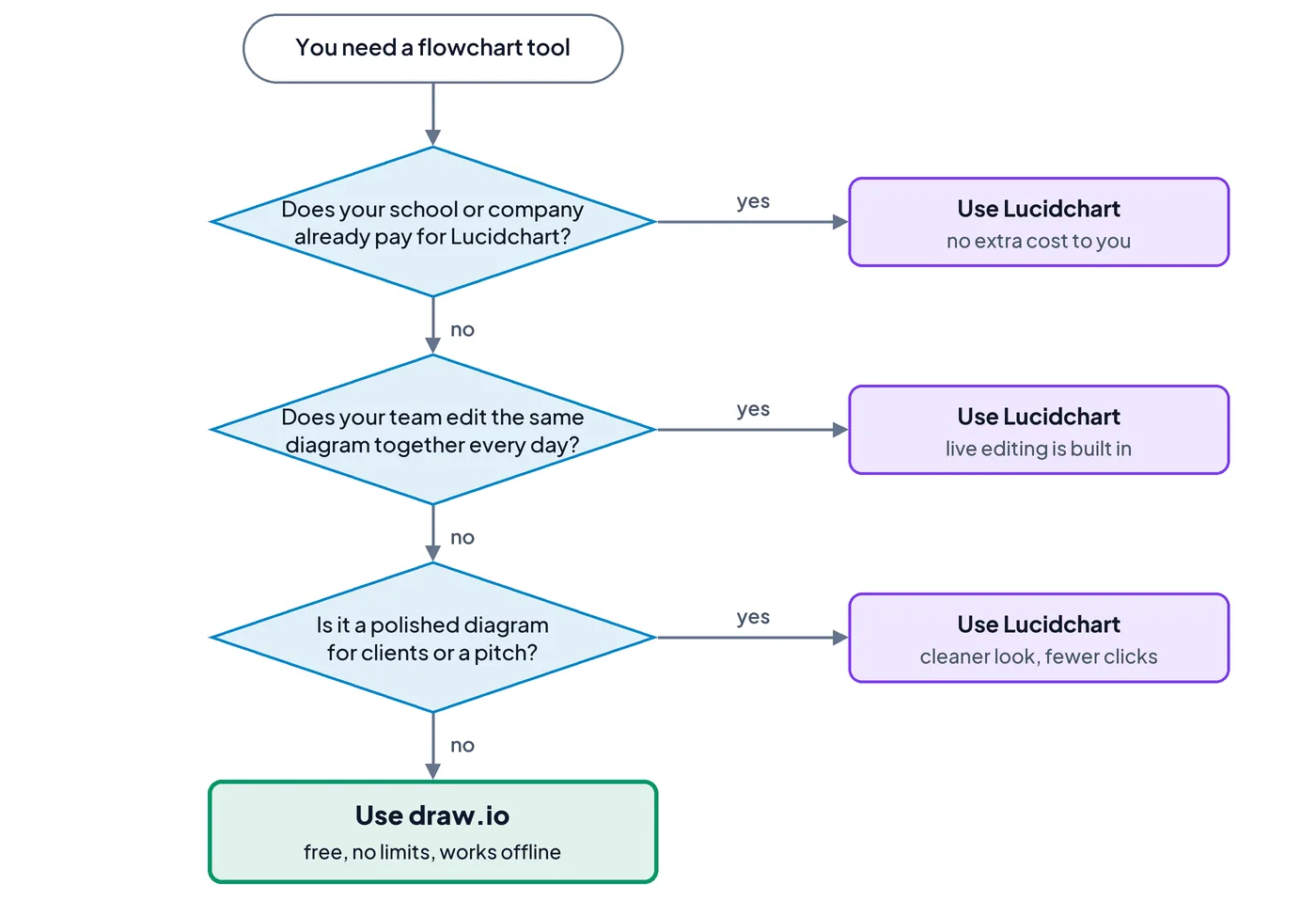
Pick draw.io if you want a free flowchart tool with no limits, you work alone or in a small group, or you care where your files are stored. Pick Lucidchart if your team edits diagrams together every day, your company already pays for it, or you want the most polished-looking results with the fewest clicks.
| Feature | draw.io | Lucidchart |
|---|---|---|
| Price | Free | Free plan; paid from $9/month (Individual, billed yearly) |
| Free plan limits | None: unlimited diagrams and shapes | 3 editable documents, about 60 shapes each |
| Account needed | No | Yes |
| Works offline | Yes, with the desktop app | No, it runs in the browser |
| Desktop apps | Windows, Mac, Linux | None |
| Live editing together | Yes, when the file is saved in Google Drive, OneDrive or Confluence | Yes, built in |
| Where your files live | Your computer or your own cloud storage | Lucid’s servers |
| Free for students | Free for everyone | Free education account, still capped at 3 editable documents |
| G2 rating | 4.4/5 (445 reviews) | 4.5/5 (8,500+ reviews) |
Price and free plans: where they differ most
draw.io is free. Not a free trial or a free tier, just free. The web app and the desktop apps have no document limit, no shape limit, no watermark and no sign-up. The only paid versions are the draw.io apps inside Atlassian’s Confluence and Jira, which are priced through Atlassian.
Lucidchart’s free plan is much tighter:
- 3 editable documents. Only your three most recent documents stay editable. Older ones turn view-only, according to Lucid’s own support staff on its community forum.
- About 60 shapes per document. Every box, diamond and arrow counts. A detailed flowchart hits that fast.
- Paid plans start at $9 a month for one person (billed yearly). Team is $10 per user per month with a 3-user minimum.
For a team of five, that’s $600 a year for Lucidchart and $0 for draw.io.
The student catch
Lucid offers a free education account to students and teachers who sign up with a school email. That sounds like the answer for students, and it partly is: it removes the shape limit.
But it doesn’t remove the document limit. On the free education plan, only your three most recently created documents are editable, same as a normal free account. Unlimited editing needs a paid education license, usually bought by the school.
And school licenses can go away. UC Santa Cruz ended its campus Lucidchart license in February 2026 and told users to export their files or buy their own plan. If your team’s diagrams live in an account you don’t control, have a plan for that day.
A draw.io file, on the other hand, is just a file. It doesn’t expire when you graduate.
Ease of use: Lucidchart looks nicer, draw.io gets out of your way
This is where Lucidchart earns its money. Reviewers who’ve used both say the same few things again and again:
- Fewer clicks. One reviewer who uses both at work wrote that the same diagram takes noticeably fewer steps in Lucidchart, and that it’s easier to change an existing diagram there.
- Smarter connectors. Lucidchart’s arrows tend to land where you expect. A common draw.io complaint is a connector end pointing the wrong way after you move a shape.
- Better-looking results. One Capterra reviewer imported an old draw.io file into Lucidchart and said it simply looked better there.
draw.io’s weak spot is how it looks. Reviews call the interface dated and the side panels crowded, and some settings are buried in menus. It’s the classic open-source trade: everything works, nothing is pretty.
But “easier” depends on what you’re making. For a normal flowchart (start, steps, a few decisions, an end) draw.io is quick to learn. You drag a shape, drag an arrow, type a label. On Hacker News, several longtime users said they prefer it because it’s simpler and lets them get an idea down fast. One said they’d spent so long fighting Lucidchart’s iPad app that they could have made the chart in draw.io in ten minutes.
There’s also a twist at the high end. A final-year computer science student reviewing Lucidchart on Capterra said it’s the better production tool in theory, but it struggled once their project got complex. If you’re not sure which shapes you need, our guide to flowchart symbols covers them all.
Working together on a diagram
A lot of people assume draw.io can’t do live collaboration. It can, with one condition: the file has to be saved somewhere shared.
If you save a draw.io diagram to Google Drive or OneDrive and share it, everyone editing sees each other’s cursors and changes in real time, according to draw.io’s documentation. It works the same in Confluence Cloud. Google Drive also keeps the revision history and lets you leave comments.
The catch is that it all runs through someone else’s storage. You set it up yourself, sharing settings come from Drive or OneDrive, and if a browser blocks third-party cookies the connection can fail. One user also grumbled that draw.io drops new files into the root of their Google Drive, which gets messy.
Lucidchart was built for this from day one. You share a link, people jump in, and you get comments pinned to specific shapes, mentions and a presentation mode, all in one place. For a team that reviews diagrams together every week, that smoothness adds up.
One thing to know for mixed teams: on Lucidchart, a collaborator on a basic free account still runs into the 60-shape limit when editing a shared document, according to Lucid’s community moderators. For a student team, everyone should be on an education account.
For a school team of five or six, draw.io in a shared Google Drive folder is usually enough. For a company team living in its diagrams, Lucidchart is smoother.
Files, privacy and offline work
This is the part people don’t think about until it bites them.
draw.io keeps your files yours. There’s no account, so there’s nothing to log into or lose. You save diagrams to your own computer, Google Drive, OneDrive, Dropbox or GitHub. The desktop app works fully offline on Windows, Mac and Linux. A .drawio file is plain text, so engineers keep diagrams in Git next to their code. You can also export a PNG with the diagram data tucked inside, so the image opens back up as an editable diagram later.
Lucidchart keeps your files on Lucid’s servers. That’s what makes sharing easy, but it means you need an internet connection, and your diagrams live in an account. You can export to PNG, PDF, SVG and Visio, but the editable original stays in Lucid’s own format. If your plan lapses or your school’s license ends, you’re downloading in a hurry.
Switching between them
Good news: you’re not locked in either way.
- Lucidchart to draw.io: select everything in Lucidchart, copy it, and paste it into draw.io. To move a whole account at once, draw.io has a Chrome extension that converts all your Lucidchart documents into .drawio files.
- draw.io to Lucidchart: Lucidchart can import .drawio files. Lucid’s community forum notes the import opens as a new document rather than inside the one you’re working on.
Complex diagrams may need cleanup after either move. Basic flowcharts usually come through fine.
What real users say about Lucidchart and draw.io
Read enough threads and a pattern shows up. Individuals tend to choose draw.io. Companies tend to pay for Lucidchart.
One Hacker News user summed up draw.io as “the In-N-Out of charting software”: not the best at everything, but rarely disappointing. That’s the general feeling.
Why people stick with draw.io:
- It’s free with nothing held back, so there’s no upgrade nagging. One user said Lucidchart’s upsell messages and free-tier limits are exactly what pushed them to draw.io, and it handled their side projects just as well.
- It does almost everything they need. A common line is that it covers nearly all of what they used Lucidchart for, while feeling lighter.
- It works offline and keeps files local, which matters for engineers and anyone handling private work.
- Long-time users on Capterra say they keep trying alternatives and coming back.
Why people move to Lucidchart:
- Diagrams look more polished, especially for presentations and client work.
- Collaboration and integrations (Google Workspace, Microsoft 365, Slack, Jira, Confluence) are deeper and easier to set up.
- Templates and AI-generated drafts save time on bigger diagrams.
The common complaints:
- draw.io: dated look, crowded panels, connectors that need nudging, live editing that depends on Drive or OneDrive.
- Lucidchart: the tight free plan, older documents going view-only, price for teams, and one G2 reviewer said the sales team took the shine off a good product.
One more pattern from the forums: when a company switches from draw.io to Lucidchart, the decision often comes from above. One engineer said their company dropped draw.io for Lucidchart and they still weren’t sure why, since it felt slower to them.
Which one should you pick? My take
For flowcharts, I’d pick draw.io.
It’s free, it does the job well and it’s easy to learn. If you’re a student, you’re trying to save money, you only need a flowchart, and you don’t have a lot of rules or company standards to meet, use draw.io. You’ll never hit a paywall halfway through a project, and your files are still yours after the class or the season ends.
Lucidchart is the better pick in a few specific cases:
- Your company or school already pays for full Lucidchart. Then use it. Everyone’s diagrams are in one place and you’re not paying anything extra.
- Your team edits the same diagrams together every day. Lucidchart’s built-in collaboration is smoother than draw.io through Google Drive.
- The diagram is client-facing. If it goes in a pitch or a polished report, Lucidchart gets you a cleaner look with less work.
- You need deep integrations. Data-linked diagrams, Jira and Slack connections and similar features are where Lucidchart pulls ahead.
If none of those apply, start with draw.io. You can always move your diagrams to Lucidchart later.
Common mistakes when choosing a flowchart tool
- Testing on a sample diagram. Both tools feel fine on a 5-box demo. Build your real flowchart in the free version first and see whether the connectors and shapes behave.
- Not counting your documents. On Lucidchart’s free plan, your fourth document makes your first one view-only. If you’ll keep more than three flowcharts going, plan for that from day one.
- Assuming the student account is unlimited. It removes the shape cap, not the 3-document cap.
- Saving draw.io files only to one laptop. If your team needs the file, save it to a shared Google Drive or OneDrive folder from the start. That’s also what turns on live editing.
- Pricing it for one person. A paid plan that looks cheap for you adds up fast for a whole team.
- Treating the flowchart as the plan. A flowchart shows the order of steps. It doesn’t track who owns each step or when it’s due. That part usually ends up in a separate doc or spreadsheet, and that’s where projects start to drift.
When a flowchart needs to become a plan
If all you need is a diagram, draw.io or Lucidchart will do the job, and you don’t need anything else. Flowboard is for the moment after that, when the flowchart turns into actual work with owners and deadlines. Here’s how we’d do it:
- Start with the flowchart. Flowboard has the standard flowchart symbols and swimlanes, and decisions label their Yes and No paths for you.
- Turn steps into tasks. Give each step an owner, a status and a due date, and the timeline and calendar build themselves.
- Hold work until it’s ready. Gates keep a step from starting until what it depends on is done.
- Zoom into big steps. A large step opens into its own sub-board with the detail inside.
You can see that style of planning in our post on what NASA HUNCH taught us about planning engineering projects, or try Flowboard free for 7 days.
Frequently asked questions
Is draw.io better than Lucidchart?
For most people making flowcharts, yes. draw.io is free with no document or shape limits, works offline and needs no account. Lucidchart is better for teams that edit diagrams together every day, need deep integrations or want the most polished look. Start with draw.io and switch only if you hit one of those needs.
Is draw.io really free?
Yes. The draw.io web app and desktop apps for Windows, Mac and Linux are completely free, with unlimited diagrams, every shape library and every export format. There’s no account and no watermark. The only paid versions are the draw.io apps for Atlassian Confluence and Jira, which are billed through Atlassian.
Is Lucidchart free for students?
Partly. Students and teachers who sign up with a school email get a free Lucid education account that removes the shape limit. But only your three most recently created documents stay editable; older ones become view-only. Unlimited editing needs a paid education license, which is usually bought by the school.
Can draw.io do real-time collaboration like Lucidchart?
Yes, if the diagram is saved in Google Drive, OneDrive or Confluence Cloud. Everyone editing the shared file sees each other’s cursors and changes live, and Google Drive keeps the revision history. Lucidchart’s collaboration is smoother because it’s built in, with comments on shapes and easy link sharing.
How do I move my Lucidchart diagrams to draw.io?
Copy and paste works for single diagrams. Open the diagram in Lucidchart, select everything, copy it, and paste it into draw.io. To move a whole account, draw.io’s Chrome extension converts all your Lucidchart documents into .drawio files at once. Complex diagrams may need some cleanup after the move.