Flowchart vs. Mind Map: Differences, Examples & When to Use Each
Flowchart vs. mind map: Compare their differences, explore examples, and learn when to use each for project planning, brainstorming, decision-making, and organizing ideas.
You open a blank page to plan something. A science fair project, a robotics build, a product launch. Then you stall on the classic flowchart vs. mind map question. Which one do you actually need?
They look alike. Both are boxes connected by lines. So most people grab whichever one their app offers first, and it goes wrong in a quiet way. The brainstorm gets forced into neat arrows before anyone knows the steps. Or the actual plan stays a messy web of bubbles that nobody can follow.
Back in high school, our NASA HUNCH team had neither. Everything lived in one long Google Doc. We didn’t need a fancier doc. We needed a picture of our ideas early on, and a picture of our steps later.
This post covers the difference between a flowchart and a mind map in plain words. You’ll see the same project drawn both ways, a quick test for picking the right one, and the mistakes that make each one useless.
Flowchart vs. mind map: the short answer
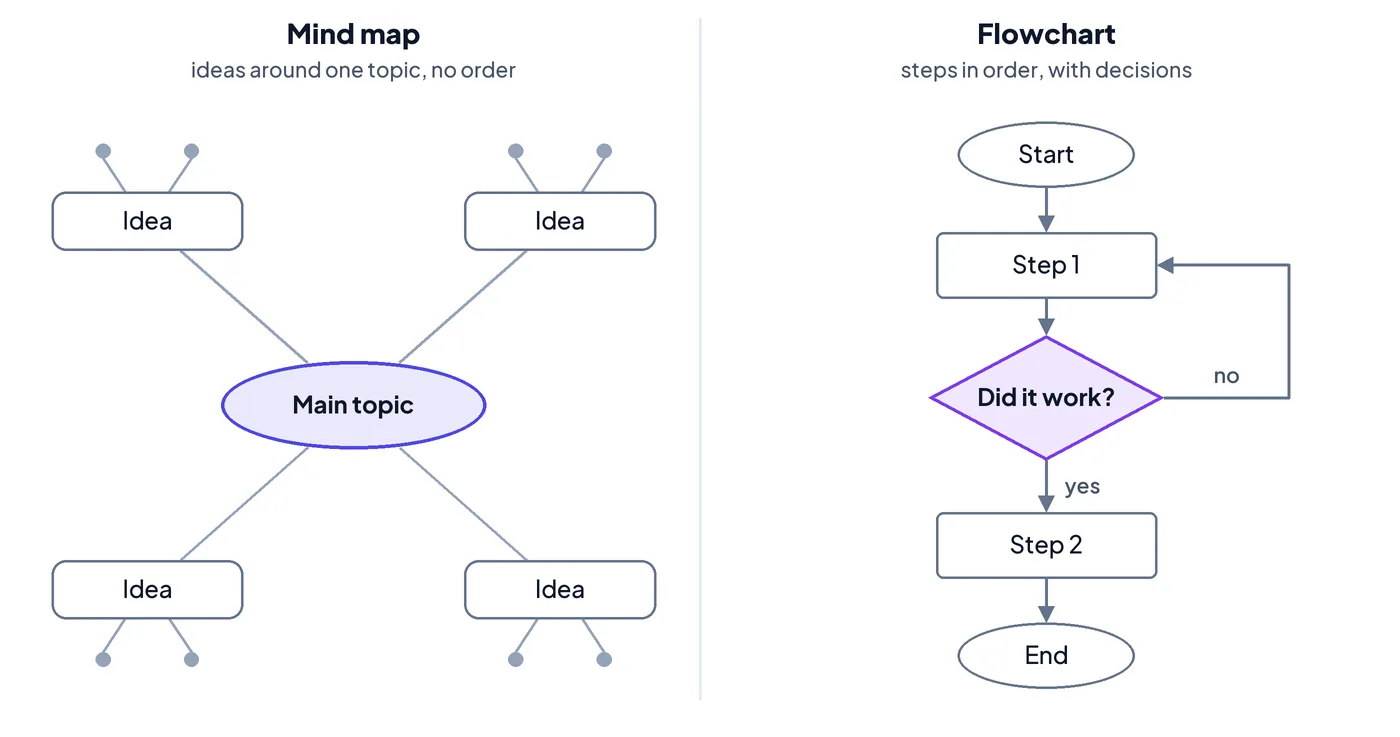
A flowchart shows the order things happen in. A mind map shows how ideas connect to one main topic.
That’s the whole difference. A flowchart has a start, an end and arrows that say “do this, then this.” A mind map has a center and branches that say “these things belong together.” There’s no first or last.
So the rule of thumb is simple. If you’re still figuring out what’s involved, mind map it. If you already know the steps and someone has to follow them, flowchart it.
What is a flowchart?
A flowchart is a diagram of a process. Each step sits in a shape, and arrows show the order you do them in. The American Society for Quality calls it a picture of a process’s steps in sequential order, and lists it as one of the seven basic quality tools.
What makes a flowchart a flowchart is the decision. At some point the path splits: “Did the test pass?” Yes goes one way. No loops back. That’s something a mind map can’t show.
You only need a handful of flowchart symbols to start:
- Oval: where the process starts and ends.
- Rectangle: one step, like “order parts.”
- Diamond: a yes/no question that splits the path.
- Parallelogram: something going in or out, like data or materials.
- Arrow: the direction of flow.
Our guide to flowchart symbols covers the rest. Flowcharts are at their best when other people need to follow the same steps the same way. Think build checklists, approval steps, testing procedures, onboarding, or code logic. If you want to go deeper on tools, we compared the best flowchart software and Lucidchart vs. draw.io.
What is a mind map?
A mind map is a diagram of ideas around one topic. You write the topic in the middle. Main ideas branch off it, and smaller details branch off those. Federation University’s study guide describes it as a way to give structure to brainstorming, so you get more ideas down and can see how they relate.
There are no required shapes. No arrows that mean “next.” You can add a branch anywhere, any time. That freedom is the point. You don’t have to know the order of anything to start one.
Mind maps are great for:
- Brainstorming a project before you know the steps
- Taking notes in class or studying for a test
- Breaking a big topic into pieces
- Spotting what you forgot (an empty branch stands out fast)
The trade-off is that mind maps mostly make sense to the person who drew them. One writer on Microsoft’s old Tip o’ the Week blog put it well: a mind map is more useful for sorting out your own brain than for explaining things to someone else.
Key differences between a flowchart and a mind map
| Flowchart | Mind map | |
|---|---|---|
| Shows | The order of steps | How ideas relate to one topic |
| Shape | A path from start to end | A center with branches |
| Reading order | One way, follow the arrows | Any direction |
| Decisions | Yes, with diamonds | No |
| Symbols | A small standard set | None required |
| Best stage | Once you know the steps | Before you know the steps |
| Made for | The people doing the work | Mostly the person thinking |
| Answers | “What happens next?” | “What’s involved?” |
Three of these rows matter more than the rest.
Direction. A flowchart moves. A mind map spreads. If your idea has a “then” in it, it wants arrows.
Decisions. Real processes split and loop. “If the part doesn’t fit, re-cut it.” A mind map has no way to say that, so it skips the spots where things tend to go sideways.
Audience. A flowchart is written for someone else to follow. A mind map is written for you to think. Hand a teammate your mind map and they’ll see your ideas, but not what to do on Monday.
When to use a mind map vs. a flowchart
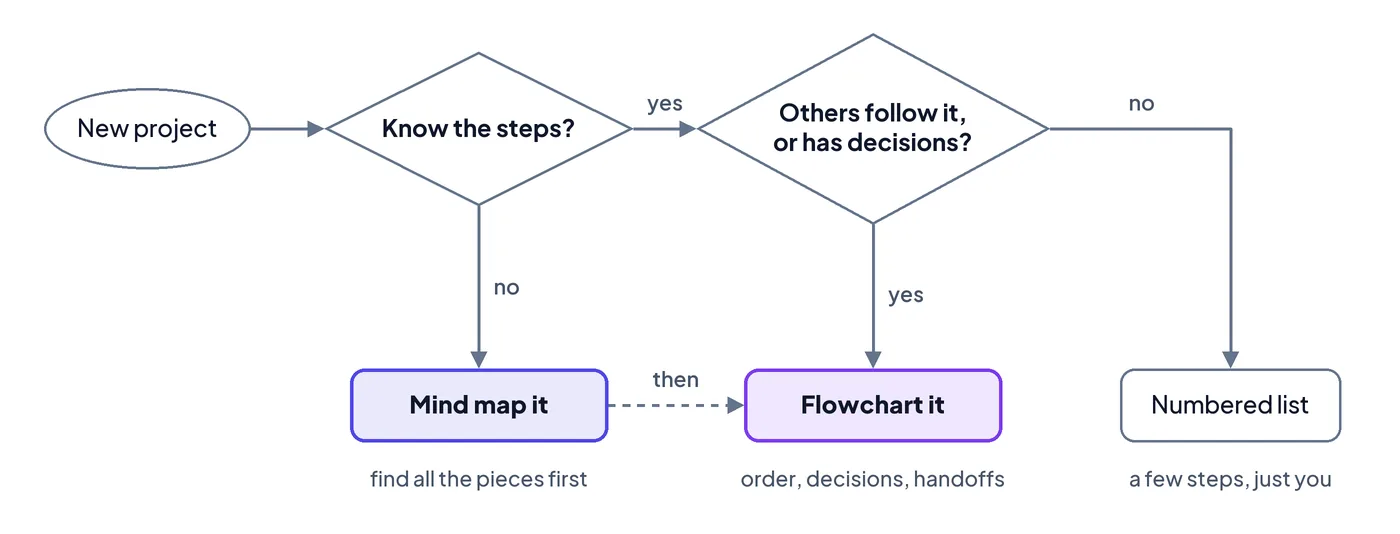
Ask yourself one question: do I know the steps yet?
If not, start with a mind map. You can’t put things in order before you know what the things are. Forcing arrows too early makes you guess, and the guesses end up looking like a plan.
If you do know the steps, ask a second question: will someone else follow this, or are there decisions in it? If yes to either, draw a flowchart. If it’s just a few steps for you alone, a plain numbered list is fine. Not everything needs a diagram.
Here’s the same test as a picture. (Yes, it’s a flowchart. It has a decision in it.)
Example: one science fair project, drawn both ways
Definitions only go so far. So let’s take one project and draw it twice.
Say you’re testing which paper towel brand soaks up the most water. Right now it’s just an idea and a due date.
Step 1: mind map it. Put the question in the middle. Then dump everything you can think of onto branches: materials, variables, how you’ll test, what goes on the board, and what’s due when. Don’t worry about order.
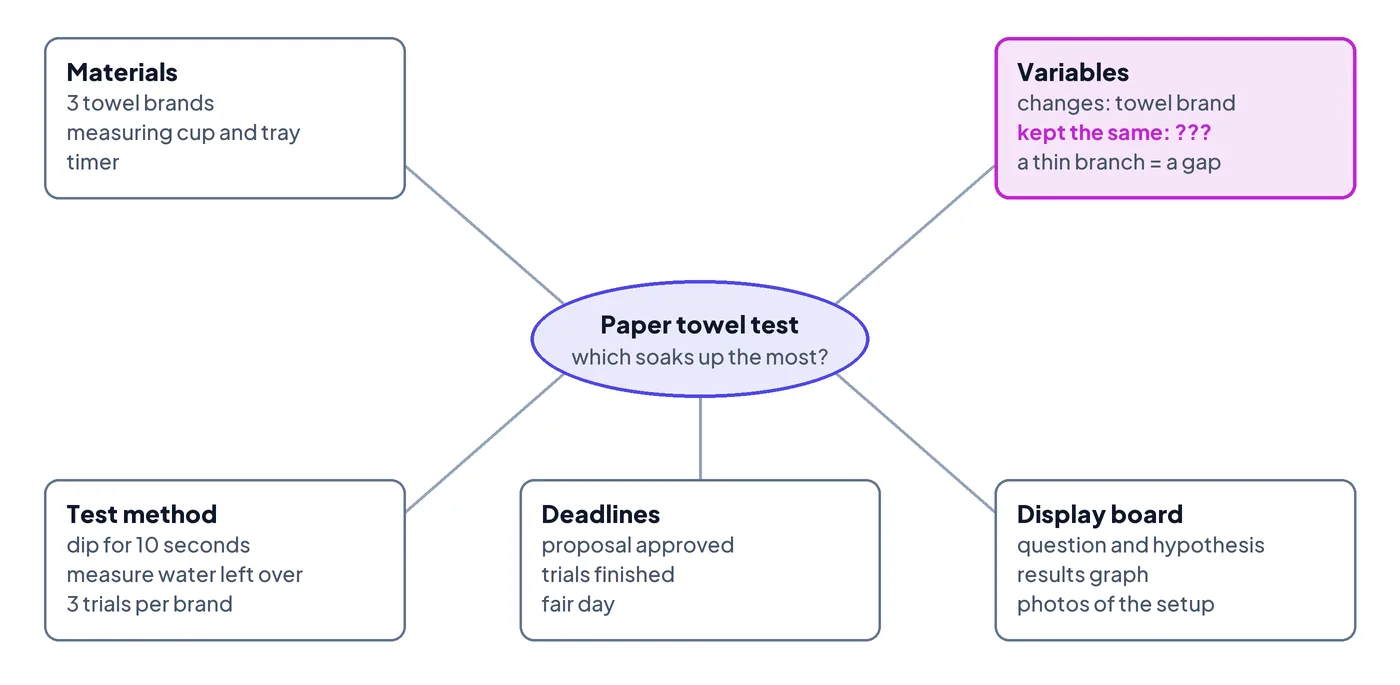
Look at what that gives you. You can see the whole project on one page, and you notice gaps. Maybe the “Variables” branch only has one item. That’s a sign you haven’t thought about what you’ll keep the same between tests.
Step 2: flowchart the part you’ll actually do. Once the branches are filled in, the order shows up. You can’t run trials before you have materials. You can’t build the board before you have results. Now draw it as a path.
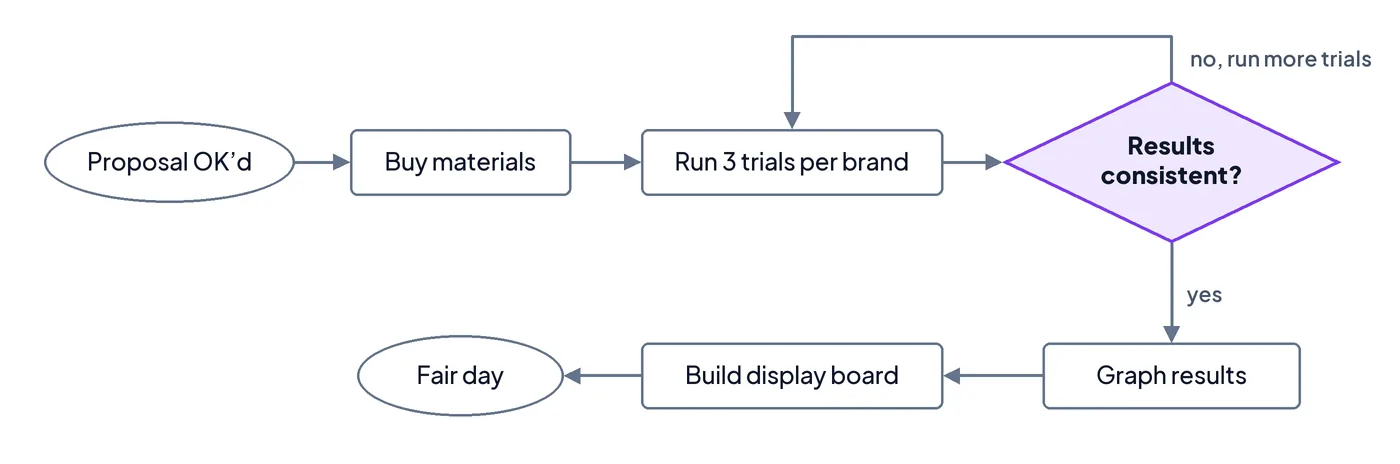
The mind map made sure nothing was missing. The flowchart is what you follow day to day, and it catches the loop a mind map can’t: if your results are all over the place, you run more trials before moving on.
From there, each step gets a due date and you’ve got a real plan. Our science fair timeline shows what that looks like week by week.
Mind map first, flowchart second: what people who use both say
You don’t have to pick one forever. A lot of people who use these tools regularly end up using both, in that order.
Dianna Deeney, a quality engineer with over 20 years in manufacturing and design, told this story on her Quality During Design podcast. Someone on social media asked for help with a mind map. After reading the thread, she suggested a process flowchart instead, because what they were really trying to do was map a process. Her general advice is pretty relaxed: don’t get stuck picking the “right” tool. Pick one, and switch if it isn’t helping.
She made another point that’s easy to miss. Building diagrams in software during a team meeting tends to slow everyone down, because people end up fighting the tool instead of thinking. Her fix: sketch on paper or a shared whiteboard first, then clean it up later.
On the other side, a writer at XDA Developers admitted to once writing off mind maps as glorified flowcharts for consultants. That changed after using them to learn a new subject, where jumping around between ideas is exactly how learning works.
And research backs the split. A University of Malta study found students liked mind maps for studying and remembering material, but noted they don’t teach problem solving on their own. That’s the flowchart’s job.
So the pattern is pretty consistent:
- Mind map to explore. Get every idea, part and question out of your head.
- Circle what you’ll actually do. Not every branch makes the cut.
- Flowchart the work. Put those pieces in order, mark the decisions, and show what has to wait for what.
- Add owners and dates. A flowchart with no names or deadlines is still just a drawing. Our guide on turning a big goal into a step-by-step plan walks through this part.
Common mistakes with flowcharts and mind maps
- Flowcharting too early. You draw neat arrows on day one, then spend the next week redrawing them every time you learn something. If the steps keep changing, you weren’t ready. Go back to the mind map.
- Treating the mind map as the plan. A mind map tells you what’s involved, not who does what or when. Teams that stop here end up with lots of ideas and no next step.
- Leaving out the decisions. A flowchart that’s just a straight line of boxes is really a list. The useful part is the diamond: what happens when the test fails, the part doesn’t fit, or the client says no?
- Cramming too much in. A mind map with 80 branches, or a flowchart that runs off the page, stops helping. Split big steps into their own smaller chart.
- Drawing it and never touching it again. Plans change. A diagram nobody updates turns into wall art. Take ten minutes a week to fix what’s out of date.
We learned number 2 the hard way. On our HUNCH team, effort was never the problem. What we didn’t have was a clear path from all our research and ideas to who was building what, by when. (The full HUNCH story has the details.)
Doing it in Flowboard
We built Flowboard for the step after the mind map: turning what’s in your head into a plan people actually follow. You lay steps out on one canvas, connect them in order, and every step carries an owner, a status and a due date. Here’s how we’d use it for the example above:
- Lay out the flow on one canvas, with flowchart symbols and swimlanes when you need them (visual project planning).
- Hold steps until they’re ready. A gate keeps “build the board” locked until results are in (gates).
- Break big steps into their own board so the main chart stays readable (sub-boards).
- Get a timeline and calendar for free, built from the dates you already set (project timelines).
If you’ve got a project sitting in a mind map or a messy doc right now, you can try Flowboard free for 7 days.
Frequently asked questions
What is the main difference between a flowchart and a mind map?
A flowchart shows the order of steps in a process, while a mind map shows how ideas connect to one central topic. Flowcharts have a start, an end, arrows and decision points. Mind maps branch out from the middle with no fixed order, which makes them better for brainstorming than for instructions.
Is a mind map better than a flowchart for project planning?
Neither is better on its own; most projects need both. Use a mind map first to list everything the project involves, like tasks, materials and risks. Then use a flowchart to put the work in order, show decisions and mark what depends on what. Add owners and due dates to finish the plan.
When should you use a mind map instead of a flowchart?
Use a mind map when you don’t know the steps yet. It’s the right tool for brainstorming, taking notes, studying, or breaking a big topic into parts. Once the order of the work is clear, or someone else needs to follow it, switch to a flowchart so the steps and decisions are easy to follow.
Can a mind map be turned into a flowchart?
Yes, and that’s the most common way to use them together. Circle the branches of your mind map that are real tasks, put them in the order they have to happen, and add a diamond anywhere the path splits. Ideas that aren’t tasks, like background notes, can be attached to the steps they support.
What are the basic flowchart symbols?
The basic flowchart symbols are an oval for start and end, a rectangle for a step, a diamond for a yes/no decision, a parallelogram for inputs and outputs, and arrows for the direction of flow. Those five cover most school, engineering and business processes. Mind maps have no required symbols at all.